Post into Oracle
Capturing an invoice is only half the job. Posting it into Oracle is the other half.
Invoice automation usually starts with a familiar promise: capture the invoice, extract the data, automate the process. But a critical question often gets skipped. Once the invoice has been captured, validated and approved, how does it actually post into Oracle?
If the answer is "we create a file and someone imports it," the invoice has not been posted. It has been handed off, and the process is not fully automated.
The real value comes from three things working together: using Oracle data to validate the invoice, matching it to the purchasing process, and posting the completed transaction into Oracle Payables without recreating the manual work automation was supposed to remove.
What "post into Oracle" actually means
In this article, posting into Oracle means the validated invoice is created as a transaction in Oracle Payables. We are not talking about posting accounting to the General Ledger, which Oracle handles after the invoice exists.
Oracle already holds the information needed to decide whether an invoice is valid: suppliers and supplier sites, purchase orders and PO lines, receipts, business units, payment terms, accounting and tax information, and other ERP-controlled data.
The post is the final step of a connected process, not a separate one.
The file is not the problem. Manual handling is.
File-based import has its place. The issue is everything that lands on AP when the file must be handled by hand:
- Someone has to manage and import the file.
- Someone has to spot failed records.
- Someone has to work out which invoice caused a batch to fail.
- Someone has to deal with data that did not meet Oracle's requirements.
At that point the invoice has been digitised, but the post into Oracle is still a manual job.
Validate against Oracle before you post
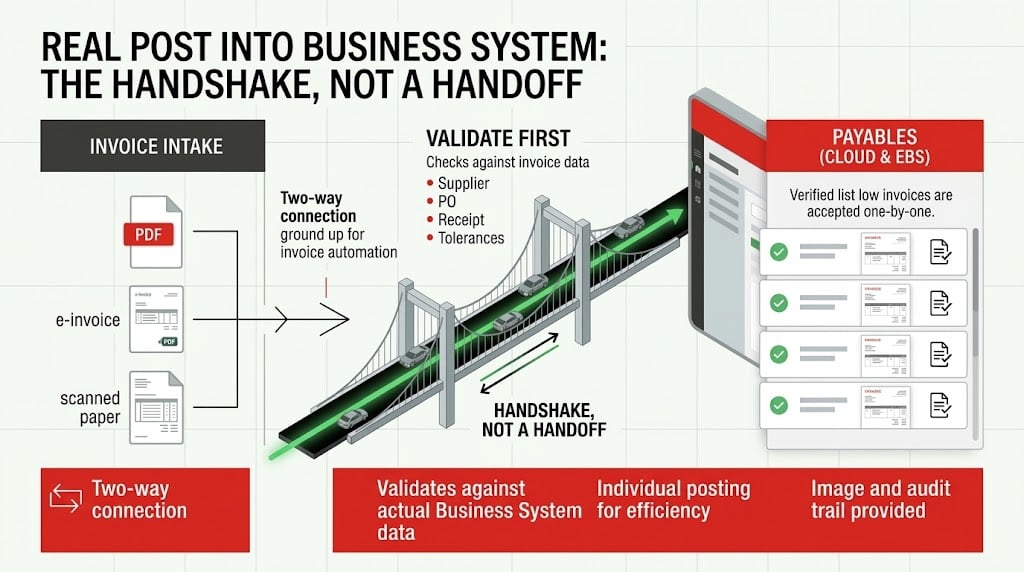
A post that has not been checked against Oracle data is just a faster way to create exceptions. Before posting, the automation layer should answer:
- Does the supplier exist, and is the supplier site correct?
- Does the PO exist, and does it belong to the expected business unit?
- Do the invoice lines correspond to the PO lines?
- Are quantities and prices within tolerance?
- Has this invoice already been processed?
- Is there enough information to continue?
Only once those checks are complete should the transaction post into Oracle.
What happens when Oracle rejects the post?
Even a well-designed process will hit exceptions: a supplier site is not assigned correctly, a PO cannot be found, a required field is missing, a value falls outside tolerance, or the transaction fails an Oracle validation.
The failed post should be identifiable, the reason understandable, and the invoice still connected to its supporting information, with a clear path to correction and resubmission.
Why posting needs a two-way connection
"We can send invoices to Oracle" and "we integrate with Oracle" are not the same claim. A complete process needs information flowing both ways:
Integration means a two-way connection with proper error handling.
Fusion Cloud and E-Business Suite: same goal, different architecture
Oracle Fusion Cloud. The key question is how the solution uses Fusion data to validate the invoice and how the validated transaction posts into Oracle Payables.
Oracle E-Business Suite. EBS environments have historically posted invoices through database connections and Open Interface Tables, while Fusion uses cloud mechanisms such as APIs and file-based import.
The technology differs. The business requirement does not: the validated invoice should post as an Oracle transaction without creating another manual task.
Post invoices individually, not in batches
If a batch of 500 invoices contains one error and the whole batch fails, AP has a new manual problem. Individual posting isolates the exception so one bad invoice does not become everyone else's problem.
The invoice image and audit trail should post with it
Posting financial data is only part of the job. AP also needs access to the original invoice, the processing history, any changes and their reasons, and the reason for rejection or correction.
How Mi Invoices posts into Oracle
Mi Invoices was built for Oracle, not adapted to it:
The test: importing versus posting
Importing
A file is created and someone in AP imports it, monitors the batch and investigates failures.
Posting
The validated invoice is created in Oracle Payables, individually, with its response, image and audit trail connected.
Questions to ask about how invoices post into Oracle
Posting into Oracle is where the process proves itself
The goal is to build a controlled, connected process that ends with a clean post: capture the document, validate against Oracle, match it to the purchasing process, resolve exceptions, post the validated transaction, and keep the invoice, transaction and audit history connected.
The invoice should not stop at the automation platform. It should post into the place where the financial process actually lives: Oracle.
Posting invoices into Oracle Payables
What does it mean to post an invoice into Oracle?
Posting into Oracle means creating the validated supplier invoice as a transaction in Oracle Payables. It is different from posting accounting to the General Ledger after the invoice exists.
Why should invoices be validated before posting into Oracle?
Validation checks the invoice against Oracle supplier, supplier-site, purchase-order, receipt, tolerance and duplicate information before the transaction is created.
What happens when Oracle rejects an invoice post?
A connected process should identify the failed invoice, return Oracle's rejection reason and keep the invoice linked to its supporting information so the issue can be corrected and resubmitted.
Why post invoices individually rather than in batches?
Individual posting isolates exceptions. One invalid invoice can be corrected without holding up other invoices that are ready to enter Oracle Payables.
How does Mi Invoices post into Oracle?
Mi Invoices uses a two-way Oracle connection so Oracle data can support validation and matching before the post, while Oracle responses return to the invoice process for visible exception handling.
Want to see it for your environment?
Ask us to walk one of your invoices from receipt to an accepted post in Oracle.